Showing posts with label iphoneography. Show all posts

Tuesday, January 16, 2018

The Weight of Words

the weight of words

some things in life can not be fixed
...they can only be carried

this piece began with a picture of my front
porch taken with the slow cam app on my
iphone. i added the figure and background 
writing with procreate..texture in distressed fx
 then finished by adding letters across her back
 in path on. 

if you could smell this picture.... 
it would smell of 
sadness


Tuesday, September 2, 2014

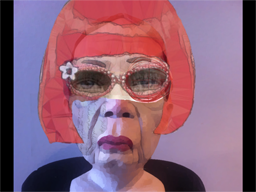
Red On My Mind a Digital Collage Tutorial


Geri Centonze over at Art of Mob issued a challenge
on instagram to create a face collage using parts from
different photos. this is one of my favorite things to do
so i created Red On My Mind. i thought i'd walk you 
through my creative process to show how i made this piece.

i began with a picture taken with my iPhone at a ceramics
exhibit.


i opened this in iColorama app and changed it
to a painterly look.


opened this in Procreate app and then opened
my color outside the lines collage as another
layer and erased everything except the eyes.


below is what i ended up with. i also brought in a layer
with a letter written in a childs handwriting and erased
it all except what you see on the cheek.


then i opened the above image in ImageBlender as
the background and opened the picture i did below
as the foreground.


i played around with the opacity modes and
slider and then masked out all but the hair and glasses.


i took this photo back to iColorama and again
applied a painterly look. next i wanted a better
background so i opened my Tintype collage
in ImageBlender as the background and then 
brought in the above image that i had painted.


i moved the woman off center and then masked
out all but her figure. next i took the combined
photo back to iColorama and used brush/paint
to do a wash of color over the numbers to
make them fit my colors. i wasn't too happy
with top of her nose so i took the picture back
to ImageBlender and brought in the original
painted ceramic picture on top and masked
all but the nose to cover that light patch under
her glasses. i like how it turned out. i'd also
like to say that i'm sure all these steps could
have been done in iColorama…i'm just not
that good with the app…it's a powerful app and
one that i would suggest you add to your
collection.

Sunday, May 18, 2014

Rainy Morning Walk….

Here are a couple of pics I took this morning on a 
walk around my yard. 


Yes….I HAD to snazzy them up with a couple of apps.
I've become quite obsessed with apps….BIG bang for
little bucks!

Here's the raw shot of the succulent:


I used Oggl (Hipstamatic) to get the effect above.
I have Hipstamatic on my iPhone…it lets you shoot
using a combination of lens and old film types but
I like shooting raw and opening the image in Oggl 
to see which combos I like best.

And the chives:


I opened this image in Snapseed and converted it to
HDR then saved and opened in my new favorite…
Tinned Cam and added the light effect and color
change. Easy peasy!

A little snazzing up makes all the difference!

Wednesday, May 14, 2014

L-O-L-A……LOLA


Do you remember the song "Lola" by the Kinks?
It was stuck in my head all day and ended up in my
art. The original picture is an old high school photo.
I opened it in Tinned Cam and added the overlay
with the white lettering and distress marks. Next I 
used Procreate to add the "makeup" and saved the
image and then opened this image and the original
 in Image Blender. After blending the two pictures
I opened the result in Word Swag to add the lyrics.

I've recently joined a group on Facebook moderated
by Karen Divine where she suggests a direction and then
she and other artists discuss your post. The current 
challenge is to develop a series based on one idea.
I'm thinking I'll continue to bring out the "Lola" in
more old photos for my entries.

Tuesday, May 13, 2014

Bird is the Word


I haven't had much of a chance to play around with apps
lately. After watching my gran while 
we waited for her sister to arrive I woke up the
day after she went home with some kind of cold/sore throat/
nausea thingy…..yuk! Still not feeling all that well but I did
play with a new app….Tinned Cam… to create this picture.
Fun app! I can't wait to feel better so I can really explore
what this one will do.

Monday, April 21, 2014

The Seeker


More iPhoneography for you…
I shot this yesterday using Camera+ while
my grans were hunting Easter eggs then
opened it up in Pencil Camera and played
around with the filters until I got the look
I wanted. Easy peasy…..

Raw image:


and my sweet boy….


Raw image:


Monday, April 7, 2014

Arlene Was Here


My senior picture and a snapshot taken in a jail
cell where women were housed back in the 70's 
make up this piece. I used Image Blender to combine
the two…adjusting the layer mode and opacity to
get this effect. 

Originals:


Sunday, April 6, 2014

Foxy Lady


Just felt like having a little fun tonight.
Snapped a picture of a vintage sewing pattern
with Camera+ and cut out this lady's body.
Her head is from a picture I did playing 
around with free motion sewing. I combined
these two in Procreate and merged the
completed body with the background in
Image Blender adding the text with
Swag Word.

"You know you're a cute little heart breaker
Foxy
You know you're a sweet little love maker
Foxy

……Foxy Lady"
                                                                    jimi hendrix

Friday, March 21, 2014

Mobile Home with a View


Found this abandoned "home" in my asparagus
bed this morning.  I snapped this shot using
the Camera+ app on my iPhone…the only
adjustment was the lighting. I sat the shell
on the rusted lid of a galvanized can where
 I store bird seed to take the shot. Next I 
added the water/reflection below the picture.
And there you have it…mobile home with
a view.

Thursday, March 13, 2014

That Beard….


I don't know what drew me first to this picture…the beard
or the eyes. I got it from the Swedish National Heritage Board
on Flickr. It was a black and white image.

I opened it first in Photoshop…converted it to an HDR image
and burned the eye area to make them even stronger. Next I 
opened it in Focal Lab and created the blur effect. After that
I opened it in Hipstamatic and applied a lens and film combination
that gave it the grain and color. Finally I opened it in Distressedfx
and converted it into an HDR photo again to get the strong visual.

Kind of a scary looking fellow…..


Wednesday, March 12, 2014

Reflections…..


“It is when you lose sight of yourself that you lose your way.
 To keep your truth in sight you must keep yourself in 
sight... and the world to you should be a mirror to reflect
 to you your image... the world should be a mirror that
 you reflect upon.” ~ C. Joybell

Saturday, March 8, 2014

The Bee Keeper


I'm not sure where I saw this article about the bees
attending their keepers funeral but I always thought 
it was such a beautiful story. Playing around with
iPhoneography this sunny Saturday morn.


Friday, March 7, 2014

Totem


I've been taking an Iphoneography Class with Susan
Tuttle and can I just say that I'm absolutely twitterpated
by the idea of being able to shoot and edit pictures anywhere
that I happen to be. I've always carried around my Canon but
it can be cumbersome and to be able to carry an iPhone in my
pocket….well that's so much easier. I'm in app heaven at the
moment….love all the apps that I bought for this class. If you
are interested in seeing my work progress you can follow me
on Instagram….justjody59.