Showing posts with label procreate app. Show all posts
Tuesday, August 11, 2015
i am NOT my Mother
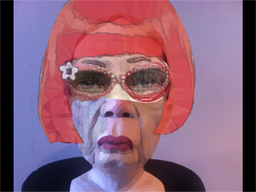
i did a little journaling with Procreate today.
i really like digital journaling. the cost of apps
is way less expensive than art supplies. i usually
print the page and glue it in one of my journals
adding a little paint or ephemera to finish the piece.
by the way….every time i pass a mirror i have
to remind myself that i am NOT my Mother...
Labels:
digital collage,
digital journaling,
drawing,
journaling,
procreate app
Thursday, July 23, 2015
Layloni
she wears flowers in her hair…..
i'm taking Gillian Lee Smiths Unearth Gather Create class
in hopes of improving my drawing/painting skills. one of my
first assignments was face mapping and shading. this is my
first attempt:
as far as face mapping.. the proportions aren't correct..
although with faces really anything goes. i opened my
drawing in iColorama and changed it in Style to
Threshold to get this:
i took this to PS CS5 and used the select tool on the
black…saving it as a png (i also made a brush to use
in CS5). this allowed me to use the drawing without
including the white background.
next i opened this image of a Klimt painting in Repix:
i used the Van Gogh brush to blur
sections of the photo ending up with this:
then on to Procreate where i added the
png of my drawing:
i cropped out the section with the face and
painted in the flower..white high lighting and
the design in the lower right corner.
next i took it to iColorama and added the lettering
in the lower left corner and the paint drips.
i then opened it in Analog…adding the white dust
and scratches…to get the finished piece.
Tuesday, July 21, 2015
Saturday, July 18, 2015
Monday, July 13, 2015
Stardust & Fire
Labels:
digital painting,
fire,
ginger,
path on app,
procreate app,
redhead,
repix app,
stars
Saturday, July 11, 2015
Thursday, July 9, 2015
Swimming in a Fishbowl
aren't we all…..
here's the original photo from the 2013 Beard
& Mustache Championship:
i added the goldfish using PS CS5 and then opened
it in Brushstroke app applying Simple 5:
opened this in Repix and blurred the background:
took this to Procreate and painted in the color/bubbles:
took this back to Repix and scatted a little dust around:
i finished up by taking it to Path On and adding my
own version of some Pink Floyd lyrics.
Wednesday, July 8, 2015
He Captured Her Heart
they have a way of doing that.......
the original photo:
opened in Brushstroke and changed to a painted image:
taken to Procreate and added some color:
still in Procreate...overlay an old digital collage,
masking out her face:
opened in Analog and added a few scratches:
took it back to Procreate and added
the heart and string:
finished by opening in iColorama and applying
Style/Coherence and painted some white
splatters using Brush/Paint
finished by opening in iColorama and applying
Style/Coherence and painted some white
splatters using Brush/Paint
Tuesday, July 7, 2015
Star Light Star Bright
…i wish i might
have this wish
i wish tonight
i started with this magazine ad:
cropped to get a close up of her head
and took that to Brushstroke to give it
a painted look:
took this to Repix and blurred the background,
smoothed some skin texture and added some stars:
opened this in Procreate and added some more color
to her face and the light reflection on the side of her
head. i finished it with "star shine" using LensLight
and adding the wording in WordSwag.
Labels:
altered photo,
brushstroke app,
digital art,
lenslight,
procreate app,
repix,
wordswag
Monday, July 6, 2015
If You Could Read My Mind
this…..reminds me of my teens
i began with a magazine photo:
i opened it in Brushstroke and applied
Simple 2:
next it was opened in Procreate where i
added a little color:
then i took it to Repix and blurred the
background to give it a smoother look:
the piece was completed in Analog
where i added the scratches.
Saturday, June 20, 2015
Ole Man and De Cat
sometimes i see a photo and just HAVE to work a
little painting mojo on it. the colors in this one sucked
me right in!
here is the original... my neighbor…Lannie…and his
new friend:
i brought the photo into brushstroke and gave it
an oil painting look:
once this was done i opened the altered photo in
procreate and added some white highlights and
gave kitty some whiskers and a few scraggly hairs
for the finished piece.
btw….HE named it Ole Man and De Cat
i am not in a position to be calling anyone
old. i only see a kind soul that rescued a
precious baby someone dumped by
the roadside.
Sunday, June 14, 2015
He Said Her Name
"it's been an ugly day" she said
"tell me something beautiful….."
and he said
her name
i read that somewhere….maybe pinterest
and thought it was beautiful.
i opened this image (an ad for fake
freckles from style.com) in Brushstroke app:
and gave it an oil painting effect with a tinted overlay:
next i took this image to Procreate app and did a few
brush strokes in her hair and painted over her face
and freckles to even out her skin:
in photoshop cs5 i added the stains
and the quote:
i finished by adding the scratches in
Analog app... as seen in the first image.
Labels:
altered photos,
analog app,
brushstroke app,
digital art,
love,
procreate app
Tuesday, September 2, 2014
Red On My Mind a Digital Collage Tutorial
Geri Centonze over at Art of Mob issued a challenge
on instagram to create a face collage using parts from
different photos. this is one of my favorite things to do
so i created Red On My Mind. i thought i'd walk you
through my creative process to show how i made this piece.
i began with a picture taken with my iPhone at a ceramics
exhibit.
i opened this in iColorama app and changed it
to a painterly look.
opened this in Procreate app and then opened
my color outside the lines collage as another
layer and erased everything except the eyes.
below is what i ended up with. i also brought in a layer
with a letter written in a childs handwriting and erased
it all except what you see on the cheek.
then i opened the above image in ImageBlender as
the background and opened the picture i did below
as the foreground.
i played around with the opacity modes and
slider and then masked out all but the hair and glasses.
i took this photo back to iColorama and again
applied a painterly look. next i wanted a better
background so i opened my Tintype collage
in ImageBlender as the background and then
brought in the above image that i had painted.
i moved the woman off center and then masked
out all but her figure. next i took the combined
photo back to iColorama and used brush/paint
to do a wash of color over the numbers to
make them fit my colors. i wasn't too happy
with top of her nose so i took the picture back
to ImageBlender and brought in the original
painted ceramic picture on top and masked
all but the nose to cover that light patch under
her glasses. i like how it turned out. i'd also
like to say that i'm sure all these steps could
have been done in iColorama…i'm just not
that good with the app…it's a powerful app and
one that i would suggest you add to your
collection.
Subscribe to:
Posts (Atom)